
The short answer is no. A digital platform can be very helpful in Flipped Learning 3.0 (FL3), but it is not essential. What matters most is the pedagogical design of the Individual Learning Space, not the technology itself.
The core idea in FL3
In Flipped Learning 3.0, adult learners and seniors engage with learning content before a group session. This Individual Learning Space prepares them for active participation, discussion, and collaboration in the Group Learning Space. The format of the materials can vary — digital or analogue — as long as they support understanding and preparation.
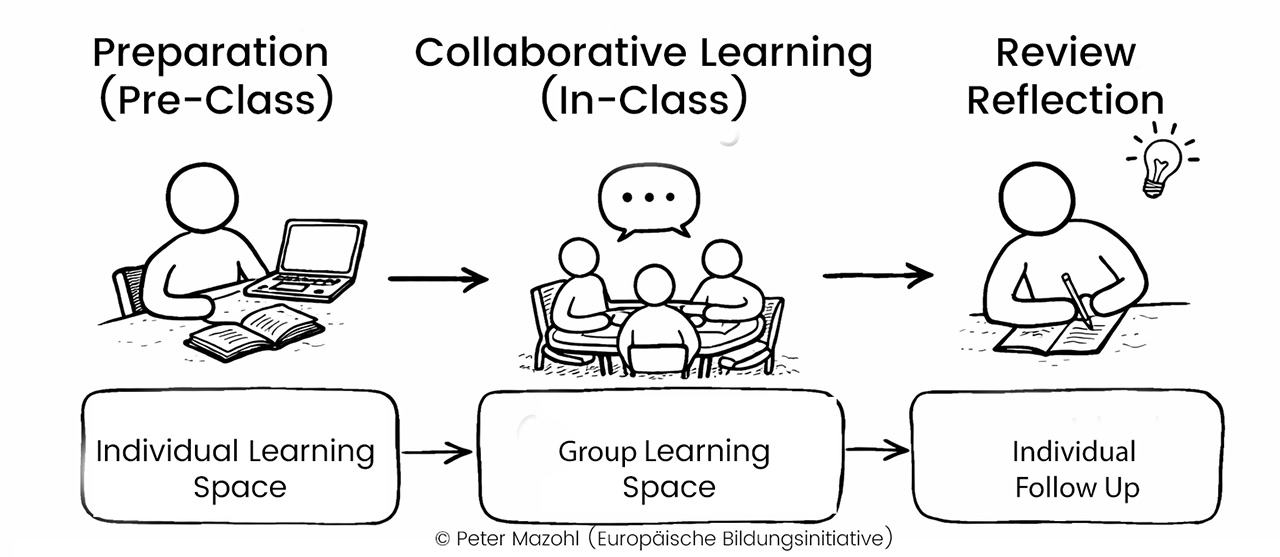
Here is a simple visualisation of the core concept of Flipped Learning 3.0
Different needs: Adult learners and seniors
Adult learners often have diverse learning preferences and life situations. Many are comfortable using digital tools, but they still benefit from clear, structured, and flexible materials.
Seniors, however, may face additional barriers. These can include limited digital skills, lack of access to devices, or simply a preference for non-digital formats. For this group, analogue materials are not only an alternative — they are often essential for inclusion and participation.

Senior reading content with his laptop (Source: Image by Vitaly Gariev published in Unsplash)
Analogue approaches — essential for inclusive FL3 design
In the FL3 framework, analogue materials play a key role in making the Individual Learning Space accessible to all. Effective options include:
- Printed reading materials — simple, well-structured texts
- Guided worksheets — with clear questions and visual support
- Audio materials — for learners who prefer listening
- Task cards — for hands-on engagement without screens
- Reflection journals — to support personal learning processes
These approaches are low-threshold, inclusive, and easy to use across different learning contexts.

Books still play an important role in learning (Source: Photo by Tima Miroshnichenko)
Where digital platforms add value
Digital tools can significantly enhance the Individual Learning Space when access and skills are available. They allow:
- Multimedia learning (e.g. videos, interactive content)
- Easy distribution and updating of materials
- Immediate feedback through quizzes
- Communication and peer exchange beyond the session
For many adult learners, digital tools increase flexibility and autonomy. For seniors, they can be beneficial if proper support and guidance are provided.
Active Learning in the Individual Learning Space
Flipped Learning 3.0 is not just about delivering content before a session — it is about ensuring that learners engage with it actively. A learner who simply reads a text or watches a video without doing anything with the material is likely to retain very little. The goal is to design the Individual Learning Space so that it requires thinking, not just receiving.
This applies equally to analogue and digital formats. The key question is always the same: does the material ask the learner to do something with what they are learning?
Making analogue materials active
Analogue materials can be highly active if they are designed with that goal in mind. Practical examples include: guided worksheets with open questions that require the learner to form their own answers, rather than simply underlining text; reflection prompts in a learning journal that ask the learner to connect new content to their own experience; sorting or matching tasks on physical cards that require decisions and judgements; and mind maps or diagrams to complete by hand, where the learner has to structure information themselves. The physical act of writing, drawing, or arranging cards also supports memory and deeper processing.
Making digital materials active
Digital formats offer additional tools for active engagement. Short embedded quizzes after a video segment prompt recall rather than passive watching. Discussion forums or shared documents invite learners to formulate and post a thought before the session. Annotation tools allow learners to highlight and comment on digital texts. Interactive simulations or branching scenarios ask learners to make choices and see consequences. Even a simple task — “pause the video after the first section and write down one question you have” — can turn passive viewing into active processing. Basically, it is a good ide to use interactive videos in general.
Whether the format is analogue or digital, active learning in the Individual Learning Space shares one core feature: the learner must produce something — a written response, a completed diagram, a decision, a question. This production is what prepares them for meaningful participation in the Group Learning Space.
Finding the right balance in FL3
In practice, effective FL3 design often combines analogue and digital elements. This blended approach ensures accessibility while still making use of the advantages of digital learning.
The key principle remains: pedagogy before technology. Start with the needs of adult learners and seniors, then choose the appropriate format.
Analogue vs Digital Materials in the Individual Learning Space (FL3)
| Aspect | Analogue Materials | Digital Materials |
| Accessibility | Very high, no technology needed | Depends on devices and internet access |
| Ease of use | Simple and familiar, especially for seniors | Requires digital skills |
| Flexibility | Fixed format | Highly flexible and adaptable |
| Learning formats | Text, paper-based tasks, audio (offline) | Video, interactive content, quizzes |
| Feedback options | Delayed, often in session | Immediate (e.g. quizzes, comments) |
| Motivation | Tangible, less overwhelming | Can be more engaging and varied |
| Inclusion potential | Strong for low-threshold access | Strong if barriers are addressed |
| Update and distribution | More effort required | Fast and scalable |